A Seedfolk build note on how crop rendering grew from simple sprite swaps into layered animation, visual yield, deterministic variation, growth pops, harvest pulses, and wind sway.
I am developing a game called Seedfolk, a cozy isometric farming game about growing little fields, making useful choices, and hopefully convincing pixels to behave like they have roots, weather, and opinions.
This post is about one very small part of that work: crop rendering.
That sounds humble. It is not. Crop rendering is where a perfectly reasonable game system starts asking unreasonable emotional questions, like:
Does this plant feel planted?
Does this field feel calm?
Does this ripe crop politely ask for attention, or does it scream like a slot machine?
Does this patch of farmland feel alive, or does it feel like a spreadsheet wearing leaves?
The first version did the job. A crop was a sprite. A plot had a crop. The crop advanced through stages. The sprite changed.
Technically correct. Emotionally beige.
So the system started to grow. What began as one image swapping into another turned into a lightweight presentation layer with visual yield, deterministic variation, authored spread, growth pops, harvest pulses, and synchronized wind sway.
No farming law was harmed in the process. The domain model stayed simple. The field just became much better at pretending it had been outside before.
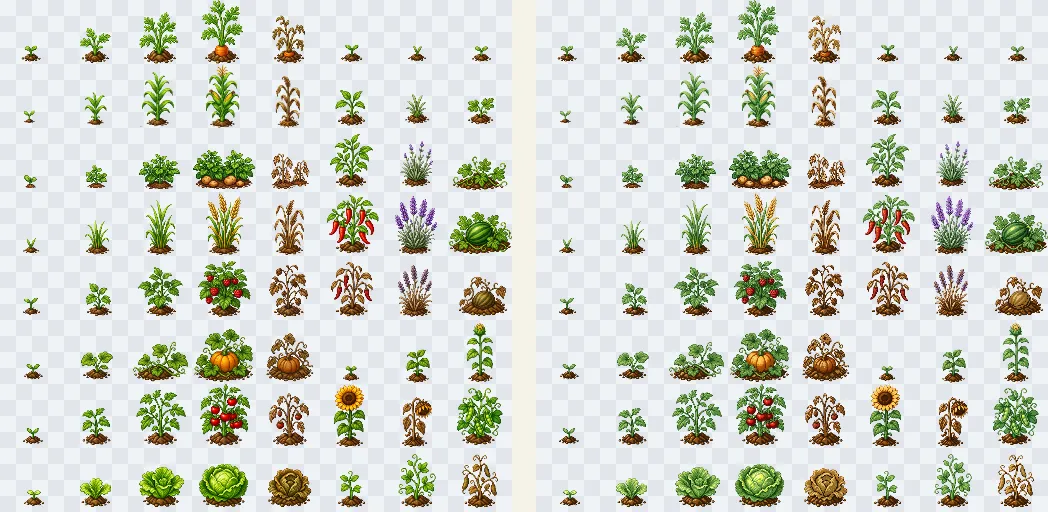
Crop tiles are still data, but staging and timing decide whether a field feels mechanical or alive.
Starting simple
Section titled “Starting simple”The first crop renderer was exactly what you would expect from a sensible person.
Each plot had one crop sprite. Each crop had a few growth stages: seedling, sapling, mature, ripe, and spent. When the crop advanced, the renderer swapped to the matching tile.
That was a good foundation. The domain knew the crop stage. Phaser rendered the correct sprite. Everything was readable, testable, and easy to reason about.
It also had the visual charisma of a seating chart.
A field full of identical single sprites becomes obviously artificial very quickly. Real plants bunch up, lean, overlap, grow unevenly, and generally refuse to stand in perfect little game-development rows.
The design question became:
How do we keep the gameplay model clean while making the field feel more organic?
The first pass was intentionally plain: one crop sprite per plot, changing stage as the domain state advanced.
Adding visual yield
Section titled “Adding visual yield”The first useful trick was letting one planted crop appear as multiple visual instances.
A single gameplay carrot could now render as two, three, or more little carrot sprites. Under the hood, nothing changed. The plot still contained one crop. The rules still treated it as one crop. The harvest logic did not suddenly panic and start counting every leaf.
The extra sprites were purely visual.
That one change made a field feel much denser. A planted crop stopped reading as one lonely object and started reading as a small cluster.
To keep that controllable, I added custom properties directly to the crop tiles:
minVisualYieldmaxVisualYieldspreadoffsetYpaddingYThose values let the art describe how it wants to sit in the world.
Some crops should be sparse. Some should bunch up. Some should sit tall. Some should hug the soil. The renderer does not need bespoke logic for every crop type. The tile data can carry presentation intent along with the image.
That matters because it keeps the system authorable. Future crops can feel different without requiring a fresh little pile of special-case code. Special-case code is where joy goes to fill out paperwork.
Visual yield lets one gameplay crop read as a small cluster, with neighboring plots varying in shape and density.
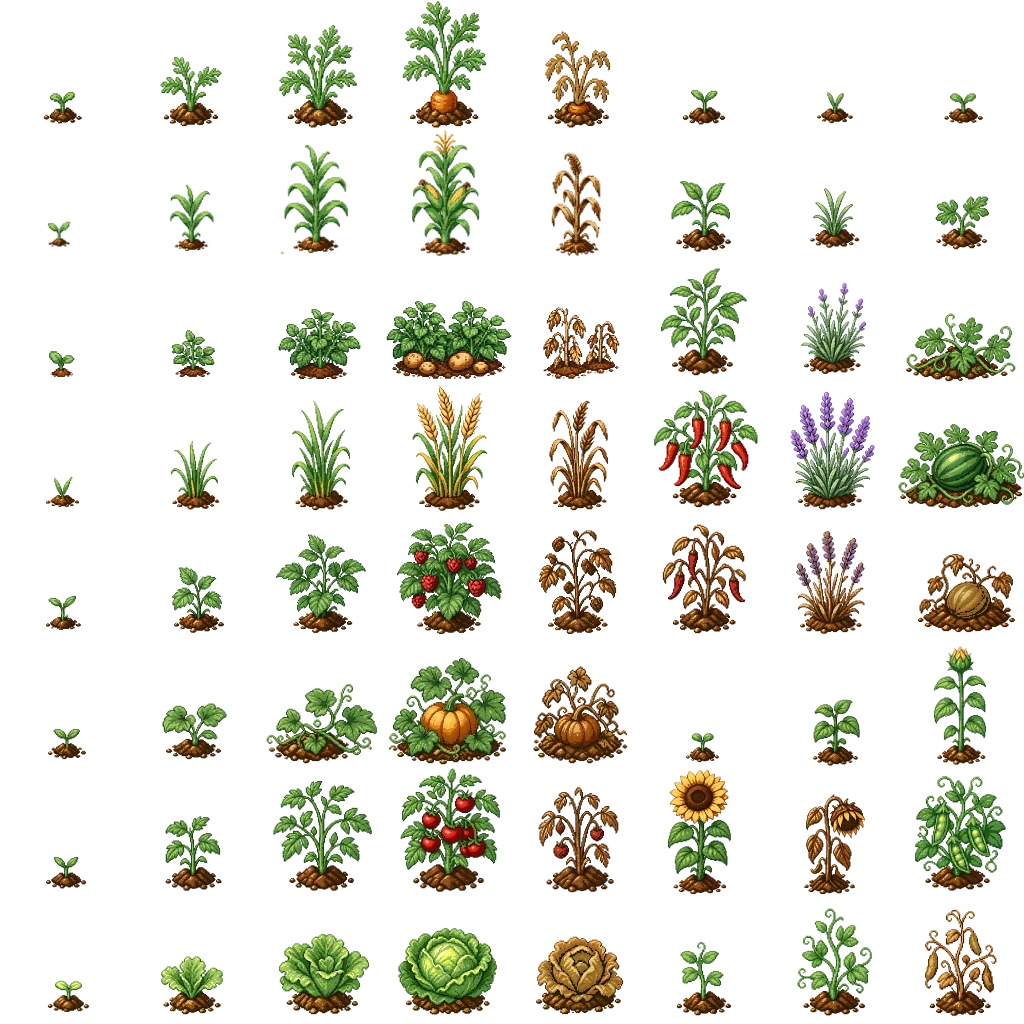
The crop sheet can carry more than art. It can also carry presentation intent: how dense, wide, tall, or clustered a crop wants to feel.
Making variation deterministic
Section titled “Making variation deterministic”Once a crop could render as a cluster, the next problem was variation.
Randomness is useful, but only after it has signed a peace treaty.
I wanted each planting to have a tiny bit of personality: slightly different positions, rotations, and scale. But I did not want sprites jumping around every frame, or changing their layout every time a plot re-rendered.
That kind of randomness does not feel alive. It feels haunted. And not in the good artisanal way.
So each crop planting gets a stable visual variation. Duplicate sprites are arranged around the crop center using evenly spaced radial directions, then pushed outward by the tile’s authored spread.
The result can differ from planting to planting, but once a crop exists, its little arrangement stays put.
That gives the sweet spot: variation without visual nonsense.
This is the visual sanity check: the crop center, spread ellipse, duplicate pivots, and isometric footprint all agree about where the plant belongs.
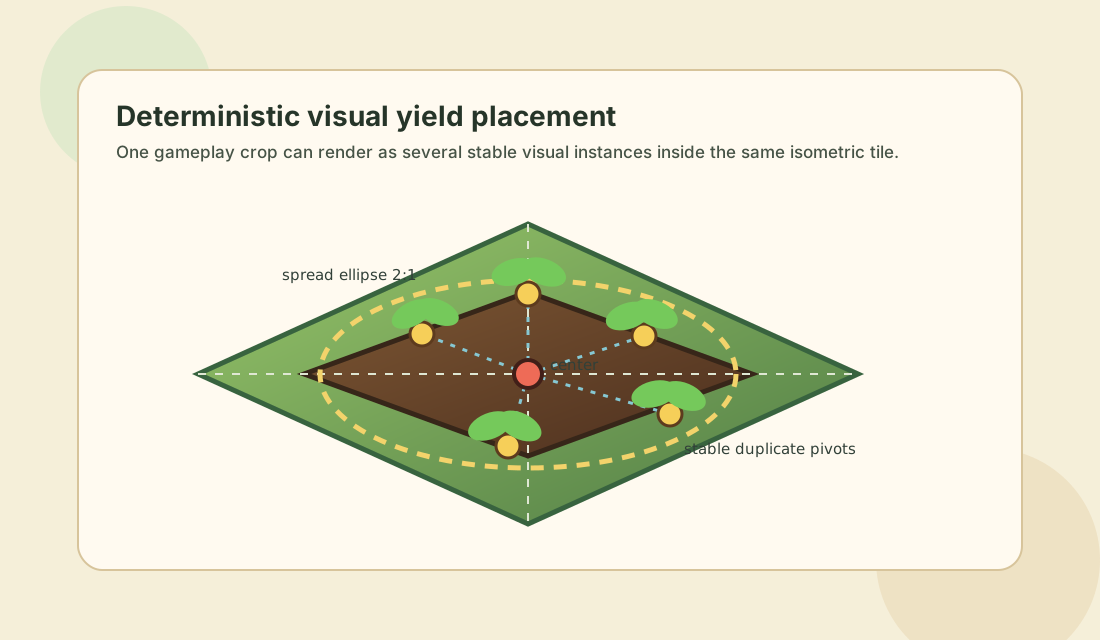
The overlay is intentionally plain. Its job is to answer one question quickly: are these plants actually rooted in the tile?
Respecting the isometric tile
Section titled “Respecting the isometric tile”One surprisingly important fix was making the crop spread match the isometric projection.
At first, a circular spread seemed reasonable. We were distributing sprites around a center point, so a circle felt like the obvious shape.
The problem is that an isometric tile is not visually circular. It reads as a diamond, and its usable footprint feels wider than it is tall. A circular crop spread made some plants look like they were drifting away from their soil, which is rude behavior for a vegetable.
So the debug shape became a 2:1 ellipse.
That small change made crop clusters easier to author. The spread area now matched the shape of the tile, and the plants started to feel planted instead of politely levitating.
The placement math
Section titled “The placement math”The core trick is that the authoring control stays simple while the rendered result respects the isometric tile.
The game treats the crop center as the middle of the plot. Then it distributes the visual duplicates around that center using evenly spaced vector directions. Those vectors are projected through an ellipse that fits inside the isometric diamond.
In simplified form, the tile constants look like this:
const ISO_TILE_HALF_WIDTH = TILE_WIDTH / 2;const ISO_TILE_HALF_HEIGHT = TILE_HEIGHT / 2;
const ISO_TILE_INSCRIBED_ELLIPSE_RADIUS_X = ISO_TILE_HALF_WIDTH / Math.SQRT2;
const ISO_TILE_INSCRIBED_ELLIPSE_RADIUS_Y = ISO_TILE_HALF_HEIGHT / Math.SQRT2;
That sqrt(2) division is doing useful little geometry work. It shrinks the ellipse so that a placement at full spread still stays inside the visible diamond. Without that, sprites can end up too close to the corners, where they start to look disconnected from the plot.
Each duplicate sprite then gets a deterministic angle and offset:
const FULL_CIRCLE = Math.PI * 2;
type CropPlacement = {  offsetX: number;  offsetY: number;  rotationRadians: number;  scale: number;};
function projectCircleToIsoEllipse(  angle: number,  spread: number,): Pick<CropPlacement, "offsetX" | "offsetY"> {  const radiusX = spread * ISO_TILE_INSCRIBED_ELLIPSE_RADIUS_X;  const radiusY = spread * ISO_TILE_INSCRIBED_ELLIPSE_RADIUS_Y;
  return {    offsetX: Math.cos(angle) * radiusX,    offsetY: Math.sin(angle) * radiusY,  };}
The placement pass uses a stable crop seed, so the result can vary between plantings without changing between frames:
function createCropPlacements({  cropInstanceId,  cropTypeId,  visualYield,  spread,}: {  cropInstanceId: string;  cropTypeId: string;  visualYield: number;  spread: number;}): CropPlacement[] {  const seed = `${cropInstanceId}:${cropTypeId}`;  const angleStep = FULL_CIRCLE / visualYield;  const angleOffset =    deterministicUnit(`${seed}:direction-offset`) * FULL_CIRCLE;
  return Array.from({ length: visualYield }, (_, index) => {    const angle = angleOffset + index * angleStep;    const projected = projectCircleToIsoEllipse(angle, spread);
    return {      ...projected,      rotationRadians: degreesToRadians(        jitter(`${seed}:${index}:rotation`, 0.4),      ),      scale: 1.2 + jitter(`${seed}:${index}:scale`, 0.05),    };  });}
The crop art still pivots from its base. In Phaser terms, that means the sprite origin is centered horizontally and pinned to the bottom vertically:
sprite.setOrigin(0.5, 1);sprite.setPosition(tileCenterX + offsetX, tileCenterY + offsetY);That one line is tiny, but it carries a lot of the illusion.
When sprites scale from the bottom, growth pops and harvest pulses feel rooted. The leaves can move, but the base stays connected to the soil. If the sprite scales from its center instead, the crop starts bobbing like it has somewhere else to be.
The final guardrail is a debug assertion: each duplicate has to land inside the isometric diamond.
That gives the visual system a useful contract. Artists can author spread, the renderer can add stable personality, and tests can still prove that crops are landing where they belong.
Growth needed a moment
Section titled “Growth needed a moment”Once the crops had more body, instant stage swaps felt too abrupt.
When a plant is just one tiny sprite, swapping it is easy to miss. But when it becomes a little cluster with shape and weight, a sudden change is obvious.
So growth needed a moment.
Before a crop changes stage, it now does a small anticipation wiggle. The wiggle builds over one second, pivoting from the bottom center of the sprite. Then, when the stage changes, the crop gets a squash-and-stretch pop before settling back down.
It is a tiny sequence:
- The crop anticipates.
- The crop changes.
- The crop settles.
Same data update. Much better little theatre.
The plant does not just become something else. It grows into it.
The stage change stops being a data update and starts feeling like a tiny event: anticipation, swap, pop, settle.
Harvest readiness
Section titled “Harvest readiness”Ripe crops needed their own signal too.
The player should be able to glance at the field and feel that something is ready, without the game shouting about it with a giant arrow and the emotional restraint of a shopping centre kiosk.
So I added a subtle harvest-ready animation. After a crop first becomes ripe, it triggers every ten seconds.
The important tuning detail was making sure the crop did not look like it was jumping out of the ground. A bounce from the center of the sprite felt wrong. It made the plant look loose, like it had stopped belonging to the tile.
Instead, the crop stretches upward from its base and settles back down.
That makes it feel eager without feeling weightless. The crop can call attention to itself while still keeping its roots in the soil.
The crop can call attention to itself without losing its roots.
Wind across the field
Section titled “Wind across the field”The final layer was wind.
A single crop swaying is nice. A whole field swaying together is where it starts to feel atmospheric.
I added a synchronized wind sway shared across crop sprites, with enough per-sprite variation to keep it from looking robotic. The field moves together, but not perfectly. That little looseness is where the motion starts to feel natural.
The tricky part was blending wind with the other animations.
Growth wiggles, harvest pulses, and wind all want to affect the same sprite transform. If each one tries to take control on its own, the animation can snap or fight itself. At that point the crops stop feeling alive and start feeling like a tiny committee having a disagreement.
So instead of abruptly switching between separate tweens, the system combines animation influences.
Wind becomes the gentle baseline motion. Growth and harvest effects layer over it.
That makes the whole field feel calmer. It keeps breathing, even when individual crops are growing or signaling that they are ready.
The field shares one gentle sway, while harvest and growth effects ride over it instead of interrupting it.
Why this felt worth it
Section titled “Why this felt worth it”None of these changes alter the core farming rules.
A crop still grows according to timers.
A plot still contains a crop.
A harvest still produces rewards.
But players do not experience the game as a set of rules and state changes. They experience timing, motion, anticipation, feedback, and atmosphere.
There is a big difference between:
The crop changed stage.
And:
The crop wiggled, popped, settled into a new form, and somehow made the field feel a little more cared for.
The technical difference is small. The emotional difference is huge.
That is the kind of detail that makes a farming game feel handmade. It is not complexity for its own sake. It is presentation doing service work for the player’s understanding.
The player learns what changed. They feel what matters. Their attention is guided without the UI needing to wave both arms.
What the system supports now
Section titled “What the system supports now”The crop renderer now supports:
- tile-authored growth stage sprites
- multiple visual crop instances per planted crop
- per-planting visual variation
- authorable spread and offsets
- debug helpers for crop placement
- growth-stage anticipation wiggles
- squash-and-stretch stage transitions
- harvest-ready stretch pulses
- synchronized wind sway
- blended animation layers
The result is still lightweight and data-driven, but the field has a lot more life in it.
The rules did not become more complicated. The presentation just got better at showing the player what changed, what matters, and where their attention should go next.
The final field reads less like a grid of state machines and more like a small patch of living farmland.
Next steps
Section titled “Next steps”The next step is making the authoring workflow smoother.
As more crops are added, each crop tile can carry more of its own visual personality: how much it spreads, how many duplicates it renders, how tall it sits in the tile, and how dramatically it animates.
That means new crops can feel different without needing new code every time.
For a farming game, that is exactly where I want this system to land: simple rules, authorable details, and a world that gets a little more charming with every pass.
The satisfying part is that none of this requires a heavy animation framework or bespoke logic for every crop. Most of it comes from small, deliberate presentation choices:
where sprites pivot,
how duplicates spread,
when motion anticipates a change,
and how the whole field breathes together.
Those are the details that turn a working farm into a place I want to keep looking at.
Which is good, because I am going to be staring at these crops for a long time.